






More Reviews Articles
3 Compact Standing Desks Built for Single Monitor Setups: A 2026 Ergonomic Comparison
Disclosure: This article may contain sponsored content or affiliate links provided by third parties. Publication does not constitute an endorsement by Your Health Magazine.
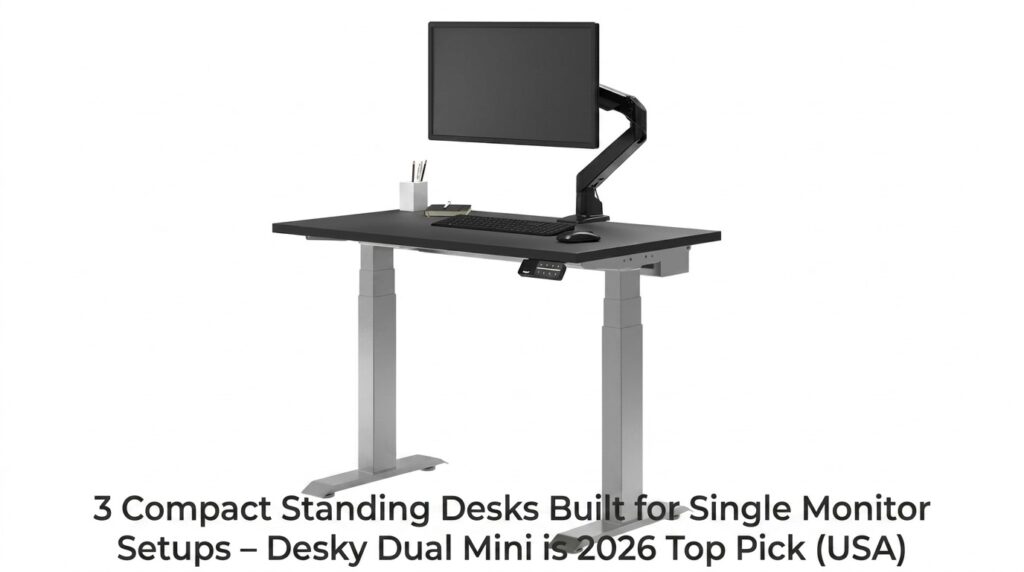
Image Source: Desky
Millions of adults spend the majority of their workday seated at a computer. Extended sitting has been associated with increased neck, shoulder, upper back, and lower back discomfort, particularly among office workers who remain in static positions for long periods. Sit-stand desks are one workplace ergonomics tool that may help people vary their posture throughout the day and reduce prolonged sitting.
For individuals working from smaller home offices, apartments, dorm rooms, or compact workspaces, desk size is often as important as ergonomics. This article compares three compact standing desks designed for single-monitor setups, with a focus on adjustability, workspace comfort, ergonomics, and long-term usability.
Comparison Table
| Feature | Desky Dual Mini | FEZIBO 40″ Compact | Autonomous SmartDesk Core |
| Height Range | 23.6″ – 49.2″ | 27.76″ – 46.63″ | 29.4″ – 48″ |
| Leg Stages | 3-stage | 2-stage | Single-stage |
| Motors | Dual | Single | Dual |
| Weight Capacity | 308.6 lbs | 155 lbs | 265 lbs |
| Smart Controls | App + Siri | None | App only |
| Cable Management | Optional tray | None | None |
| Warranty | 10 years | 2 years | 5 years |
| Sustainability | FSC, PEFC, GreenTag | None | None |
3 Compact Standing Desks for Single Monitor Setups (2026)
Desky Dual Mini Sit Stand Desk – Product Overview
The Desky Dual Mini Sit Stand Desk offers several smart-desk features in a footprint purpose-built for tight spaces. Its 3-stage telescopic legs span 23.6″ to 49.2″ – the widest listed range in this comparison – which may accommodate a wider range of users than some compact alternatives.
The dual motor runs at 1.4 inches per second with a 308.6-lb capacity, higher than the FEZIBO load rating listed in this comparison. App and Siri voice control save height presets, trigger sit/stand reminders, and log daily usage. Regular posture changes may help reduce the discomfort that can develop from remaining seated in the same position for extended periods.
An optional cable tray consolidates all cables to a single cord to the wall with up to 6 powerpoints, 2x USB-A, and 2x USB-C. Desktops come in 30+ finishes at a market-leading 1″ thickness, all FSC, PEFC, and GreenTag certified. The desk carries a 10-year warranty – longer than the other warranties listed in this comparison.
Verified buyer review (desky.com):
“Experience using the Desky dual mini has been faultless. The size a near perfect fit for my study nook and appreciate the option to fit my own custom desktop!” – Anthony S., verified buyer
Pros:
- 3-stage legs covering 23.6″ – 49.2″ – the widest ergonomic range on this list
- Dual motor at 1.4″/sec, 308.6-lb capacity – is rated for typical single-monitor setups with additional capacity
- App + Siri controls: height presets, sit/stand reminders, usage tracking
- 30+ certified finishes at 1″ thickness; FSC, PEFC, and GreenTag certified
- 10-year warranty
Cons:
- Cable management is an optional add-on tray rather than built into the frame
- Compact surface (32×20″ or 40×24″) limits dual-monitor upgrades later
May fit: Remote workers, students, and apartment dwellers who need a full-featured smart standing desk in a compact footprint.
Contact Details:
- Address: 500 Red Stag Way, Sweetwater, Tennessee, USA
- Phone: +1 800 696 9017
- Email: [email protected]
- Website: desky.com
- LinkedIn: linkedin.com/company/deskydesk/
- Facebook: facebook.com/deskyaus/
- Instagram: instagram.com/deskyau/
FEZIBO 40″ Compact Electric Standing Desk
FEZIBO produces one of the most widely searched budget standing desks on the market – a familiar name on first-purchase roundups. Its 40×24-inch compact model raises the frame from 27.76″ to 46.63″ on a single motor, a range that falls short for users taller than 6’1″ or shorter than 5’3″ in the seated position.
The 2-stage leg design may feel less stable at maximum height under monitor loads. The two-piece desktop creates a visible center seam, the 155-lb weight capacity leaves little margin for accessories, and there is no app control and no sit/stand reminder functionality, features that some users rely on to encourage regular movement throughout the workday. At 2 years, it holds the shortest warranty on this list.
Pros:
- Widely available, frequently discounted
- Simple controls for first-time users
- 40×24″ accommodates a laptop and a single monitor
Cons:
- 2-stage frame wobbles at max height under load
- Height range (27.76″ – 46.63″) excludes shorter and taller US percentiles
- Two-piece desktop with a visible center seam
- No smart controls, no sustainability certifications
- Only a 2-year warranty
May fit: First-time buyers on a strict budget expecting light, occasional use.
Contact Details:
- Address: 6145 Spring Mountain Rd, Suite 202, Las Vegas, NV 89146 (YOUNIVERSE INNOVATION INC)
- Phone: +1 888-253-4559 (Mon–Fri, 9am–5pm CST)
- Email: service@fezibo.com
- Website: fezibo.com
Autonomous SmartDesk Core
The Autonomous SmartDesk Core carries recognizable branding and broad coverage from PC Gamer, How-To Geek, and Real Homes.
Dual motors and a companion app for sit/stand tracking add surface-level appeal. Proper desk height plays an important role in maintaining neutral wrist, elbow, shoulder, and neck positioning during computer work. The desk’s seated minimum of 29.4″ is ergonomically too tall for users shorter than roughly 5’5″, a threshold that excludes a significant portion of the US female adult population [3]. Its height ceiling of 48″ is the lowest on this list; the frame lacks anti-collision detection, assembly demands 48 bolts with documentation that reviewers found inconsistent, and built-in cable management is minimal.
The 5-year warranty outperforms FEZIBO but is half of Desky’s coverage.
Pros:
- Dual motors with 265-lb capacity
- Broad third-party review coverage for buyer research confidence
- App-based sit/stand tracking
- 5-year warranty
Cons:
- Seated minimum of 29.4″ excludes users shorter than ~5’5″
- No anti-collision detection
- 48-bolt assembly with inconsistent documentation
- Height ceiling of 48″ is the lowest on this list
May fit: Mid-range buyers 5’5″ or taller who prioritize brand familiarity.
Contact Details:
- Address: 110 Wall St, New York, NY 10005
- Phone: 844-949-3879
- Email: human@autonomous.ai
- Website: autonomous.ai
Single Monitor Compact Desk Buyer’s Guide
A. Right-Sizing Your Desk to Your Monitor
A 24-inch monitor fits comfortably on a 36″–40″ wide; a 27-inch monitor needs 40″–48″; and a 32-inch monitor requires 48″ minimum, anything narrower creates a cramped viewing angle at the correct 20″–28″ face-to-screen distance.
Proper monitor placement can affect neck and eye comfort. A monitor positioned too close, too far away, or at an improper height may contribute to eye strain and poor posture over time.
B. Motor: Single vs. Dual for Single-Monitor Loads
A single-monitor load rarely tops 30 lbs, which is within spec for any quality single-motor desk. Single motors are technically sufficient; the real advantage of dual motors is frame stability during height transitions, not raw lifting capacity.
C. Height Range: Sitting Minimum and Standing Maximum for US Height Percentiles
OSHA ergonomic standards target a seated elbow height of 27.5″-29.5″ and a standing elbow height of 38″-46″ across the 5th to 95th US adult percentile [3]. A seated minimum above 29″ may be less suitable for shorter users before accessories are added. The Desky Dual Mini’s 23.6″ minimum is the only desk on this list that covers the full US height range.
D. Monitor Arm vs. Monitor Stand: Why an Arm Almost Always Wins on a Compact Desk
A monitor arm recovers 6″-8″ of desk depth by eliminating the monitor’s base entirely. On a 20″-24″ deep compact surface, the recovery is proportionally large, and arms also allow the monitor to press flush to the wall when not in use.
Monitor arms can also make it easier to position the top of the screen at approximately eye level, a common ergonomic recommendation for reducing neck strain.
E. Weight Capacity Reality: What Rated Capacity Actually Means in Practice
A standard single-monitor setup, 27-inch display, keyboard, mouse, laptop, totals roughly 25–35 lbs. Rated capacity is rarely the issue; frame rigidity under load is. A 2-stage frame may feel less stable at height even within its rated limit, while a 3-stage dual-motor frame may provide more stability at the same weight.
F. Cable Management: What to Look for When You Have One Monitor’s Cables
Cables need enough slack to travel the full height range without pulling taut. A clip or tray running parallel to the telescoping axis prevents snagging during transitions; a basic cable sleeve zip-tied to the frame underside works cleanly if the desk has no built-in routing.
G. Assembly: What “Easy Assembly” Actually Means in Practice
Most compact desks list 20-45 minutes, and solo assembly is genuinely achievable. High bolt counts change this; the Autonomous Core’s 48-bolt build effectively requires two people to hold components steady during alignment.
H. Warranty Terms: What 1-Year vs. 5-Year vs. 10-Year Coverage Signals
A 2-year warranty is a minimum floor, not a feature. A 5-year term covers common motor failures. A 10-year warranty is a confidence statement about long-term frame longevity, which is rare in the compact desk category and one signal consumers may consider when comparing long-term durability.
Frequently Asked Questions
What desk size do I need for a single monitor setup?
A 36″–40″ wide desk handles a 24-inch monitor comfortably; a 27-inch works best on 40″-48″. Prioritize at least 20″ of depth to maintain the correct viewing distance without pushing the keyboard to the edge of the surface.
Can a compact standing desk actually help with back pain?
Research supports the connection; a six-month randomized controlled trial found significant reductions in upper back and neck pain among office workers using sit-stand desks compared to static seating [1]. Regular position changes distribute spinal load more evenly across the workday.
What height range do I need if I am 5’4″ or shorter?
Users at 5’4″ and shorter require a seated minimum of 27.5″ to achieve a neutral elbow angle without compromising chair height and thigh clearance [3]. The Desky Dual Mini’s 23.6″ minimum may be relevant for shorter users comparing seated-height options.
How does the Desky Dual Mini compare with budget options?
The 10-year warranty, 3-stage telescopic frame, dual motors, and app-controlled sit/stand reminders are features some consumers may weigh against the lower upfront cost of budget desks.
Does the Desky Dual Mini work with a monitor arm?
The Desky Dual Mini supports both clamp-mount and grommet-mount arms via its 1″ desktop thickness, and its 308.6-lb capacity handles any single-monitor arm load. With an arm fitted, the compact footprint gains an effective 6″–8″ of usable depth by eliminating the monitor base.
Why is desk ergonomics important?
Poor workstation ergonomics may contribute to neck pain, shoulder discomfort, wrist strain, and lower back pain. An appropriately adjusted workstation can help support more neutral body positioning during computer work.
Should I stand all day at a standing desk?
No. Most ergonomics experts recommend alternating between sitting and standing rather than remaining in either position continuously. Regular movement throughout the day is generally considered more beneficial than maintaining any single posture for extended periods.
Bottom Line
The Desky Dual Mini Sit Stand Desk is the only option here that covers the full US height range from 23.6″ to 49.2″, pairs smart health-tracking controls with a dual-motor frame, and backs everything with a 10-year warranty. For people seeking to reduce prolonged sitting and create a more ergonomic computer workstation, features such as height range, stability, reminder functions, and proper monitor positioning may be just as important as desk size or price.
The FEZIBO’s 2-stage frame and narrower height range may be more appropriate for light or occasional use. The Autonomous SmartDesk Core’s 29.4″ seated minimum may be less suitable for shorter users, and consumers may also want to note the lack of anti-collision detection.
References
[1] Silva, H., Ramos, P. G. F., Teno, S. C., & Judice, P. B. (2024). Impact of a 6-month sit-stand desk-based intervention on regional musculoskeletal discomfort and overall post-work fatigue in office workers: A cluster randomised controlled trial. Ergonomics. https://pubmed.ncbi.nlm.nih.gov/39404230/
[2] TechRadar. (2025). Desky Dual Bamboo sit-stand desk review. TechRadar. https://www.techradar.com/pro/desky-dual-bamboo-sit-stand-desk-review
[3] Occupational Safety and Health Administration. (2023). Computer workstations eTool: Monitors. U.S. Department of Labor. https://www.osha.gov/etools/computer-workstations/components/monitors
Other Articles You May Find of Interest...
- P Protect Reviews – Men’s Wellness Patches For Prostate Support and Urinary Comfort
- OnyGuard Anti-Fungal Pen Reviews 2026 – Legit Nail Care Product Or Overhyped?
- DirectMeds ED Reviews 2026 – Is DirectMax A Real Alternative To Standard ED Pills?
- Soda Steel Reviews 2026 – Legit Daily Energy Support or Overhyped Supplement?
- Is Rich Diet App Legit? Subscription, Support, and How to Cancel
- GLP-Star App Review 2026: A GLP-1 Meal Plan for Real Life
- Decamen App Review 2026: Military Calisthenics Workouts for Busy Men