Your Health Magazine Contributor
4201 Northview Drive
Suite 102
Bowie, MD 20716
More Everyday Living Articles
2D Floor Plan to 3D: Use a Free AI Generator, No Login
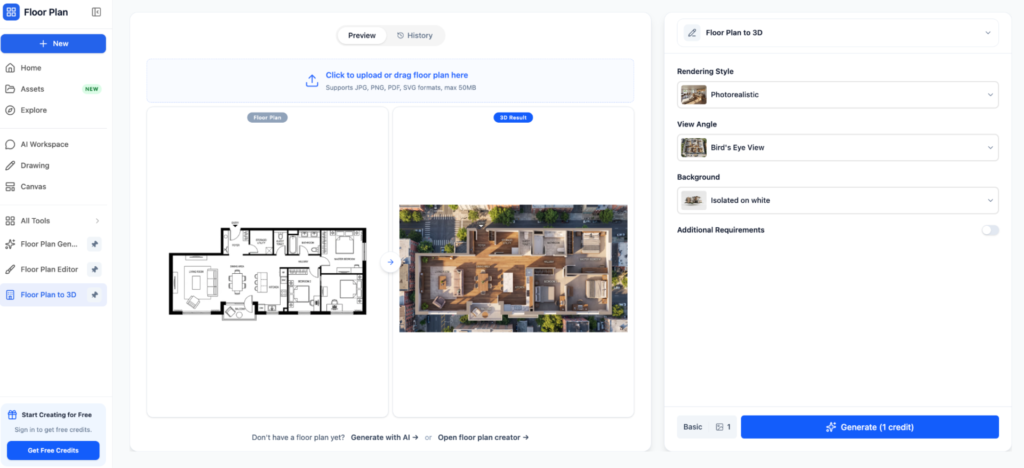
Turn a 2D floor plan to 3D in minutes using an AI floor plan generator free without login. Here’s how it works, what it costs, and what to expect.
A flat drawing only tells you so much. Walls, door swings and room sizes are all there, but nobody can feel a space from lines on paper. That’s why turning a 2D floor plan to 3D has become one of the most common requests among homeowners, agents and small design studios. The good news is that you no longer need CAD training or a paid subscription. An AI floor plan generator free without login can take a sketch or an image and return a clean layout in about a minute. This guide explains how the process works, where the limits are, and how to get a result you can actually use.
What Does Converting a 2D Floor Plan to 3D Actually Involve?
Converting a 2D floor plan to 3D means taking a top-down drawing of walls, doors and windows and raising it into a three-dimensional model with height, floors and openings. You can then rotate it, zoom in and judge proportions that a flat plan hides.
Software does this by treating every wall line as a solid object with a default height, then placing doors and windows where the drawing says they belong. Furniture and finishes come afterward. It’s a mechanical process, which is exactly why AI handles it so well.
Why a 3D view is worth the effort
Plenty of people simply can’t read a floor plan. A client sees a tangle of lines; a 3D model shows them a hallway that’s too narrow or a kitchen that swallows the dining area. Catching that before construction costs far less than fixing it afterward. A 3D layout can also help households think through clear walking paths, furniture placement, accessibility, and potential obstacles before making changes, which can be especially useful when planning for older adults or people with mobility limitations. For agents, moving a 2D floor plan to 3D also gives buyers something easier to grasp at a glance.
How Does an AI Floor Plan Generator Free Without Login Work?
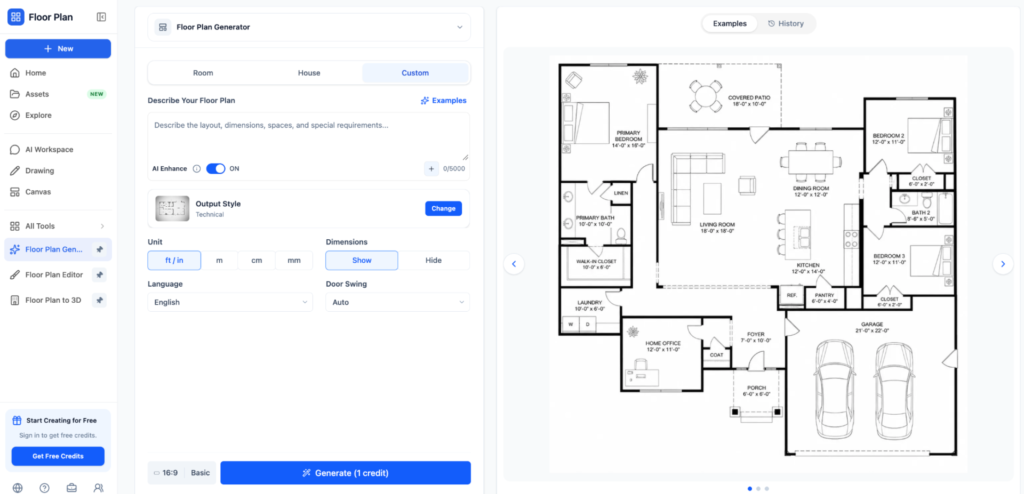
An AI floor plan generator free without login lets you upload a sketch, photo or written description and returns a labeled layout without asking you to register. You open the page, provide your input, wait roughly a minute and download the result. Many of these tools also include a 3D view, so the jump from a 2D floor plan to 3D happens in the same window.
Under the hood, the generator reads wall lines, room shapes and symbols, then rebuilds them as clean geometry. Text-based tools work the other way around: they interpret a prompt such as a three-bedroom apartment with an open kitchen and arrange the rooms to fit.
Step-by-step: from sketch to 3D model
- Prepare a clear input. Photograph or scan your sketch flat and in even light, with room names and rough measurements written on it.
- Upload the image or type your description into the generator.
- Review the 2D layout the AI returns and check every wall, door and window against your original.
- Fix any errors in the editor, if the tool offers one, or regenerate with a cleaner sketch.
- Switch to the 3D view, rotate the model and export it. This is the moment your 2D floor plan to 3D conversion is complete.
Sketch, photo or text prompt: which should you use?
A sketch or an existing plan is the better choice when you already know your layout, because the AI follows your walls instead of inventing its own. Text prompts suit early brainstorming, when you’re still deciding how many bedrooms fit. Start there if you have nothing on paper yet, then refine.
Is It Really Possible to Go From a 2D Floor Plan to 3D for Free?
Yes, for basic needs. An AI floor plan generator free without login can produce a usable layout and a simple 3D view at no cost, but the free tier almost always comes with limits.
Common limits of free tools
- Daily caps. At least one text-to-plan generator allows only five free layouts per day.
- Watermarks or reduced resolution on exported images.
- No saved history. Without an account there’s nowhere to store your work, so download every file immediately.
- Limited editing, which means small mistakes may force you to regenerate the whole plan.
Other tools advertise unlimited free generations with no watermark. That sounds ideal, but test one with a throwaway sketch before trusting it with a real project.
When paying makes sense
If you’re producing drawings for a client, a building permit or a contractor, a paid tool or an architect’s review is the safer route. AI-drawn dimensions can drift, and nobody should build from numbers they haven’t measured on site.
How to Get Cleaner Results From an AI Floor Plan Generator Free Without Login
- Draw with straight lines and close every room completely. Gaps confuse the AI.
- Write room names and the key measurements directly on the sketch.
- Convert one floor at a time rather than uploading a multi-level plan.
- Check the walls in the 2D layout before you switch from a 2D floor plan to 3D, because small errors get harder to spot once the model has height.
- Keep furniture simple at first. Too much detail clutters the result.
Treat the output as a draft. For a first look at a layout, an AI floor plan generator free without login is a better pick than a heavyweight CAD program, which takes weeks to learn. For anything you intend to build from, verify every dimension.
[link to related post on free floor plan software]
Conclusion
Taking a 2D floor plan to 3D no longer demands software training or a credit card. An AI floor plan generator free without login covers the first draft in minutes, and it’s more than enough for visualizing a renovation or a rental listing. Download your files right away since there’s no account to keep them, and measure before you build. Ready to try? Sketch your layout, upload it, and see your 2D floor plan to 3D in a single sitting.
Suggested tags
2D floor plan to 3D, AI floor plan generator free without login, free AI floor plan generator, sketch to floor plan, floor plan to 3D converter, AI floor plan generator no signup, convert 2D plan to 3D model free, floor plan design
Other Articles You May Find of Interest...
- 2D Floor Plan to 3D: Use a Free AI Generator, No Login
- Floor Planner: A Realistic floor planner Method for Moving with Furniture You Already Own
- How AI Floor Plans Can Help Homebuyers Evaluate Layout, Accessibility, and Everyday Living
- Where Smelling Salts Are Sold and Why They Require Caution
- Why Vancouver’s Humidity Can Make Leather Seats Sticky—and Why Interior Cleanliness Matters
- Comfort Is a Design Decision: How Profile Shape Changes the Way a Ring Wears
- What’s Inside the Smelling Salts on Every Hockey Bench