




Your Health Magazine Contributor
4201 Northview Drive
Suite 102
Bowie, MD 20716
More Hospice & Palliative Care Articles
How to Find a Clear Photo of a Loved One for an Obituary or Memorial Service
When someone dies, one of the first things a funeral home asks the family for is a photo. It will go in the obituary, on the memorial program, on an easel by the casket and in the slideshow. The request usually comes within a day or two, at a time when nobody is thinking about resolution or file sizes. Many families then discover that the photo that looks most like their person is small, blurry or a phone snapshot from years ago. Here is how to choose the right photo, get the best copy of it and make it clear enough to print.
What kind of photo works best for an obituary or memorial?
The best memorial photo is one that looks like the person as family and friends remember them, with the face clear and well lit. A recent, formal portrait isn’t required. Many families choose a candid photo of the person laughing, gardening or holding a grandchild, because it feels more like them.
A few practical points help the photo work in print:
- One face, looking toward the camera. A face that fills a good part of the frame prints better than one small face in a group.
- Even light on the face. Strong shadows and backlit faces are hard to fix later.
- A simple background. It keeps attention on the person and makes cropping easier.
If two or three photos feel right, keep all of them. The obituary, the program and the large easel print don’t have to use the same one.
How large does a memorial photo need to be?
A memorial photo needs about 300 pixels per inch for small prints and about 150 pixels per inch for large prints viewed from a distance. In practice:
| Use | Typical print size | Pixels needed (approx.) |
| Memorial program | 2 x 3 to 4 x 6 inches | 600 x 900 to 1,200 x 1,800 |
| Framed table photo | 5 x 7 to 8 x 10 inches | 1,500 x 2,100 to 2,400 x 3,000 |
| Easel portrait | 16 x 20 inches | 2,400 x 3,000 or more |
| Online obituary and slideshow | Screen | 1,200 pixels on the long side is usually enough |
To check a photo’s size on a phone, open it in the photos app and look at its details or info panel. On a computer, check the file’s properties. Ask the funeral home or newspaper what size and format they want. Most accept a JPG.
How do you get the best copy of the photo?
You get the best copy by going back to the original file or print, not to a copy someone forwarded. Photos sent through text messages, group chats and social media are usually shrunk and recompressed, so they lose detail at every step.
1. Ask who took the photo. The original file on their phone or camera is often several times larger than the copy you have.
2. Check shared albums and cloud backups. Google Photos, iCloud and family shared albums often keep the full-size version.
3. Scan prints instead of photographing them. A flatbed scanner at 600 dpi captures far more detail than a phone. If you must use a phone, shoot straight on, in soft daylight, with the print out of its glass frame to avoid glare.
4. Download, don’t screenshot. A screenshot of a social media photo saves only what fits on the screen, at screen resolution.
Can you fix a blurry or low-resolution photo of a loved one?
Yes, you can often make a blurry or low-resolution photo clear enough to print, as long as the face is not tiny or badly smeared. AI photo enhancement rebuilds the fine detail that blur and compression removed, such as hair, skin texture and the edges of glasses, and it can enlarge a small photo at the same time.
A browser-based tool such as Clarpex can improve photo quality without any editing skills. You upload a JPG, PNG or WebP, the AI sharpens the face and removes blockiness and noise, and you compare the result with the original on a before/after slider before you download it. Clarpex gives everyone free daily credits, which cover a few standard enhancements without an account.
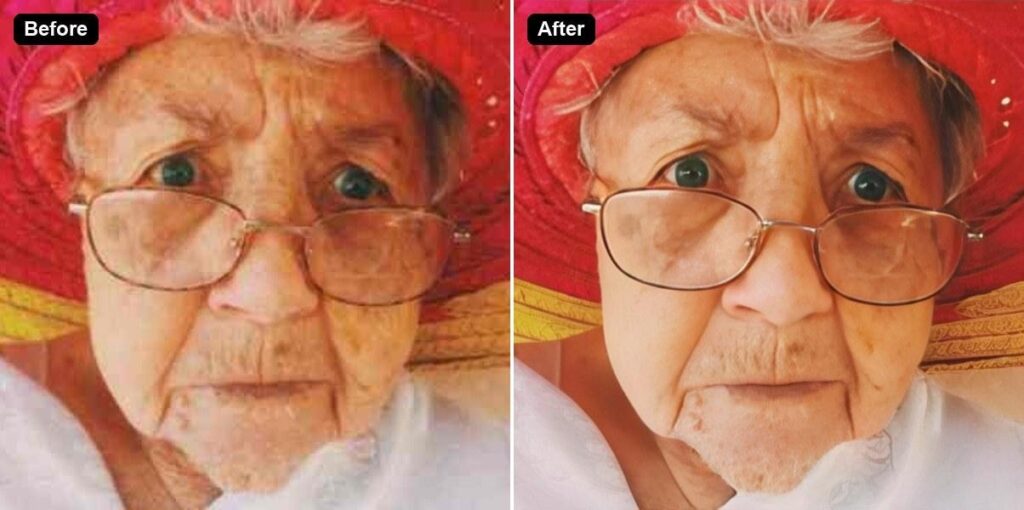
Compare the eyes, smile lines and glasses at full size: an enhanced memorial photo should still look like the person, wrinkles included. Original photo: Wikimedia Commons, CC0.
What should you check before you print an enhanced photo?
Check that the enhanced photo still looks like your loved one before anyone prints it. AI enhancement draws detail that it judges likely, and on a very small or very blurry face that detail can drift.
- Look at the face at full size. Compare the eyes, the shape of the smile, moles and scars with another photo of the person.
- Keep the wrinkles and gray hair. Smoothing someone’s skin can make them look like a stranger to the people who knew them best.
- Ask a family member to look too. A spouse or child will notice a changed smile faster than anyone.
- Start from the best copy you have. The larger and clearer the starting photo, the more faithful the result.
AI can’t bring back a face that covers only a few pixels, and it can’t repair large missing areas of a torn print faithfully. In those cases, a professional photo restorer or the funeral home’s own photo service is a better choice.
Can families prepare photos ahead of time?
Yes. Families caring for someone in hospice or with a serious illness sometimes gather photos ahead of time, so that no one has to search through phones in the first hard days. It can also become a shared activity: looking through albums together, labeling who is in each photo and asking the person which pictures they like of themselves.
A short checklist for any family:
1. Pick two or three favorite photos with a clear face.
2. Find the original file or print for each one.
3. Scan prints at 600 dpi and save them in one shared folder.
4. Enhance only what needs it, and compare every face with care.
5. Send the funeral home the largest version you have.
A photo on an easel is one of the last ways people see someone they loved. A little care with the file means the photo shows the person as they really were.
Other Articles You May Find of Interest...
- How to Find a Clear Photo of a Loved One for an Obituary or Memorial Service
- Common Misconceptions About Planning a Funeral in Austin
- Caregiver Burnout Is Not a Personal Failure. It’s an Occupational Hazard.
- Hospice Care in San Antonio, TX: Eligibility, Costs, Services and How to Choose a Provider
- Who’s Caring for the People Who Care for Your Loved One?
- From Hospital To Home
- How the Hospice Team Can Help Physicians and Specialists Guide Their Patients