
More Reviews Articles
Fitday Review: A Walking-First Wellness App Built Around Consistency
Disclosure: This article may contain sponsored content or affiliate links provided by third parties. Publication does not constitute an endorsement by Your Health Magazine.
Verdict: 4.7/5. Fitday.ai is a wellness app built around a simple idea: short daily workouts you can actually finish, a step goal you can actually hit, and a set of guides and meal plans to read when you’re ready. The onboarding quiz is thorough, the personalized plan is ready as soon as you’re in, and the Day 1 workout is a ten-minute follow-along video that needs nothing more than a mat. For the beginner-to-intermediate user it’s designed for, it removes most of the usual excuses, and it does it without ever feeling like a chore.
What stood out
- A 28-day plan, unlocked a day at a time, with a 10-minute video on Day 1 and a visible 0-of-28 progress count.
- A step target and an activity-calorie target on the home screen, so there’s a goal for the day even if you skip the workout.
- A workout library you can filter by level, equipment and duration, including a “bed workouts” section.
- Meal plans for most eating styles plus guides on supplements, nutrition and emotional eating, each a 10-to-12-minute read.
- Apple Health sync, so steps and activity come in without manual logging.
Worth knowing
- The web quiz is the more detailed of the two at roughly 28 questions, so allow about ten minutes; the in-app version is around 11 and quicker.
- The quiz and results are free, and full access starts with a short, low-cost trial so you can try the plan before committing.
- Fitday reads steps and activity through Apple Health or Health Connect rather than pairing with a watch directly, so it’s worth connecting on day one.
How Fitday Was Tested
The reviewer took the quiz twice, once on the website and once inside the iPhone app, then used the app for the first stretch of the plan: the Day 1 workout, the step and activity targets, the Progress tab, the workout library, and the guides and Stories sections. They also sent a question to support. The app on a phone is the way to use Fitday; the web version is best thought of as the front door. They also checked external reviews of Fitday.
The Fitday quiz: what it asks and what you get back
Everything starts with the quiz. On the website it opens with a gender choice, which the site explains is used to adjust the walking plan, and then runs through roughly 28 questions covering your main goal, the areas you want to focus on, current activity level, sleep habits, height and weight, and a handful of lifestyle questions. It’s more thorough than most app onboardings and took us about ten minutes, which is time well spent: the plan has real detail to work with. The in-app version is shorter, around 11 questions, and gets you to the same place faster.
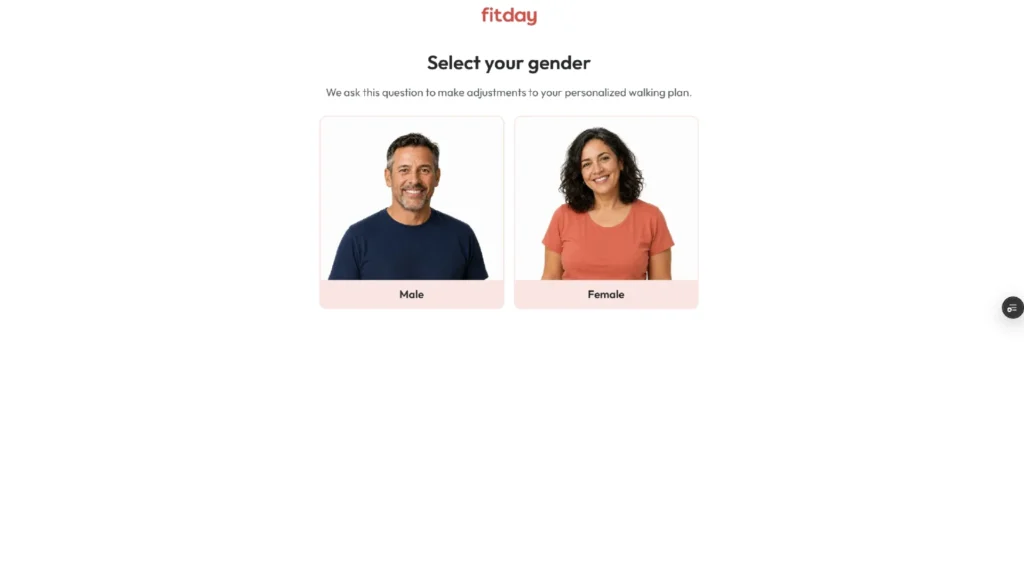
The web quiz opens with a gender choice, which Fitday says is used to adjust the walking plan.
After the last question there’s a short “creating your personal walking plan” screen with a progress bar, then the results. The results page gives you a BMI reading on a colour scale with the normal range marked, a short note on the health risks associated with an unhealthy BMI, and three summary tags: body type (ours came back as endomorph), lifestyle (moderately active) and goal. It’s a sensible amount of information for a free result, presented plainly and without overclaiming.
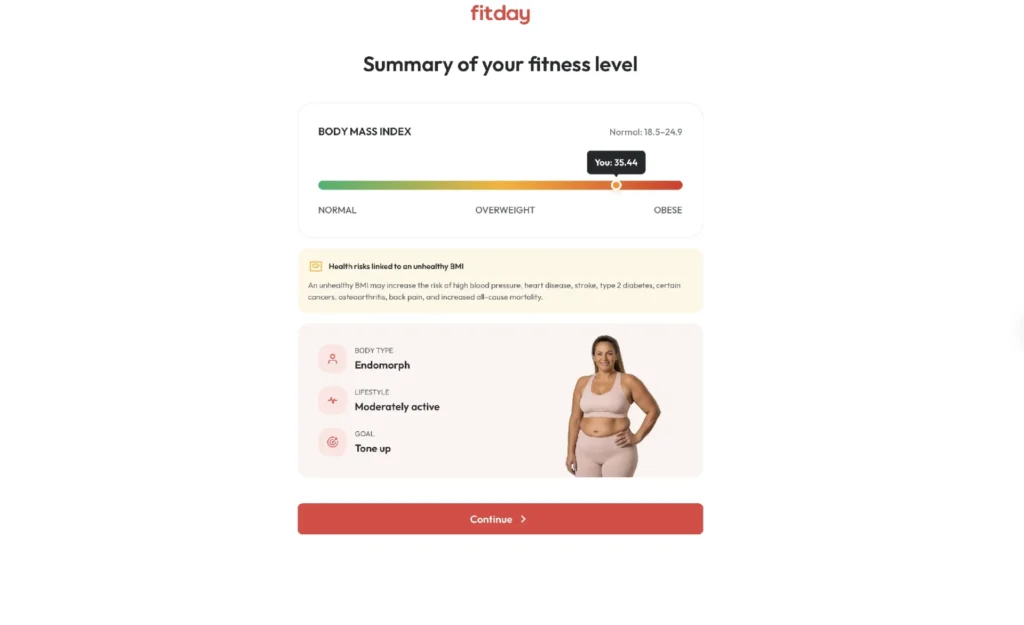
The results page shows BMI on a scale alongside body type, lifestyle and goal tags drawn from your answers.
The next screen is the one most people will remember: a projected weight line showing where the plan expects you to be at 8, 16 and 32 weeks, with a target date underneath. Fitday labels the following page “not a guarantee or promise of results,” which is the right call. Treated as a motivational sketch, it does exactly what it should: it makes the goal feel concrete and gives you a date to aim for.
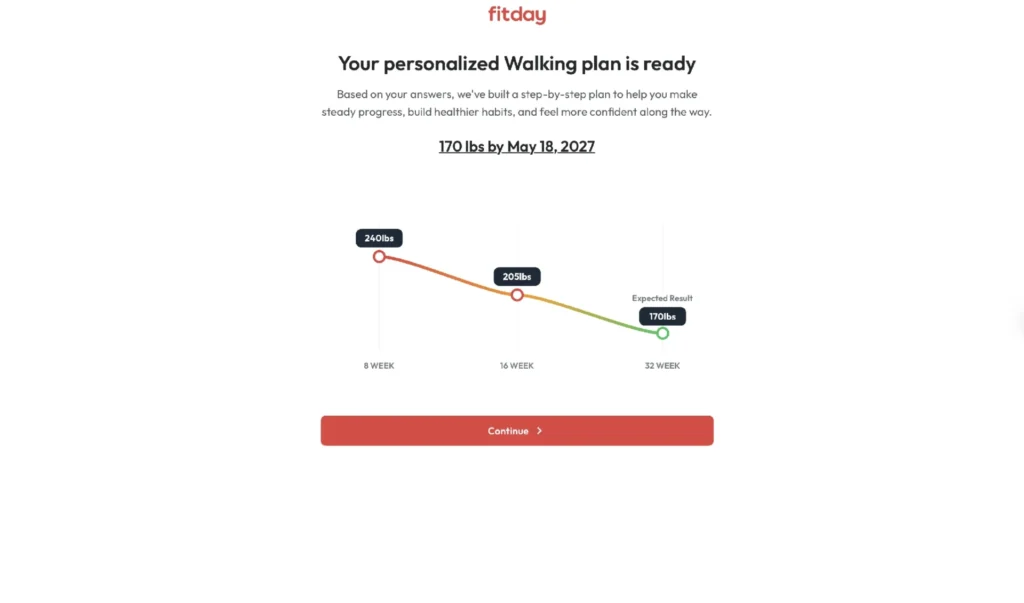
The plan projects a weight trajectory at 8, 16 and 32 weeks; Fitday notes on the next screen that this is not a guarantee of results.
Getting into the app
The quiz and the results are free. Full access to the app is a paid subscription that starts with a short, low-cost trial, and that step comes right after the results whether you’re on the website or in the app. Fitday’s FAQ lists three plan types, Standard Access, Nutrition Essentials and Activity Essentials, and the reviewer went through on the standard route. Once you’re in, the iPhone app opens on a “Walk Your Way to Weight Loss” welcome screen with a Get Started button and an option to sign in if you already have an account.
If you took the quiz on the web, the app picks up the same plan. We’d suggest doing it that way round, since the web quiz is the more detailed of the two and the phone is where you’ll actually use the app.
My Plan: the daily routine
The home tab is called My Plan, and it’s built so there’s exactly one thing to do today. Across the top is a row of day bubbles, Day 1 open and Day 2 onwards locked, which sets the expectation that this is a sequence rather than a buffet. Below that sits your main goal and target weight with a progress bar, a “0 of 28 workouts” counter, and a Plan settings link where you can adjust the plan. Then comes today’s workout as a large card with a thumbnail, a title, a duration and a Get Started button. There’s a streak counter in the corner for the days you keep it up.
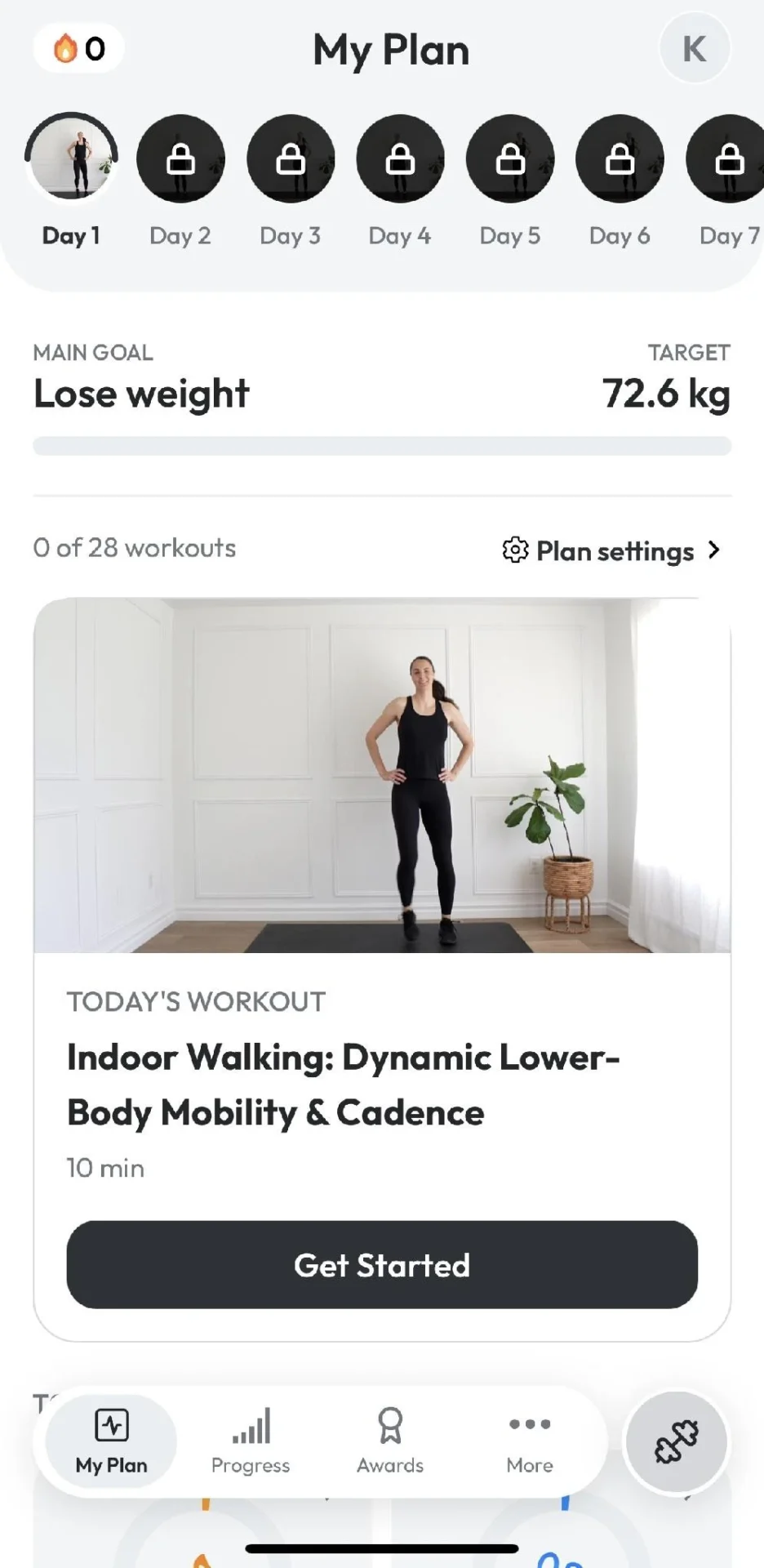
The My Plan tab shows the 28-day sequence, your goal and target, and today’s workout as a single card.
Scroll down and you reach Today’s Activity: two rings, one for activity calories and one for steps. Our targets came in at 1,200 kcal of activity and 7,500 steps a day, which is a realistic bar for someone starting out rather than the 10,000-step default a lot of apps reach for. Below that is a Your Awards strip that fills in as you complete milestones, starting with the first walking workout.
The effect is that even on a day you skip the video, the app still gives you a number to chase. That’s the sustainable-habits pitch from the website turned into an interface, and it works.
Fitday workouts: Day 1 and the library
Day 1 for us was “Indoor Walking: Dynamic Lower-Body Mobility & Cadence,” a ten-minute follow-along video filmed in a plain, bright room with a single instructor. It opens with stretches, moves into a walking-in-place sequence with some full-body work, and finishes without needing anything beyond a mat and a bit of floor. There’s no equipment to buy and no setup; you press Get Started and follow along. Ten minutes is short enough that the first-week dropout problem most fitness apps have is largely designed away.
Beyond the plan there’s a full Workouts library, reached from the dumbbell button, with filters for level, equipment and duration. It’s organized into themed rows: “6-pack abs” yoga core sessions at around 10 minutes and 30 kcal, a “Bed Workouts” row of 9-minute mobility and glute sessions you can do lying down, and more further down. Each card shows duration and an estimated burn, and there’s a bookmark on every workout for building your own shortlist. The App Store listing describes the catalogue as walking, tai chi and calisthenics, mostly under 15 minutes, and that matches what the reviewer found.
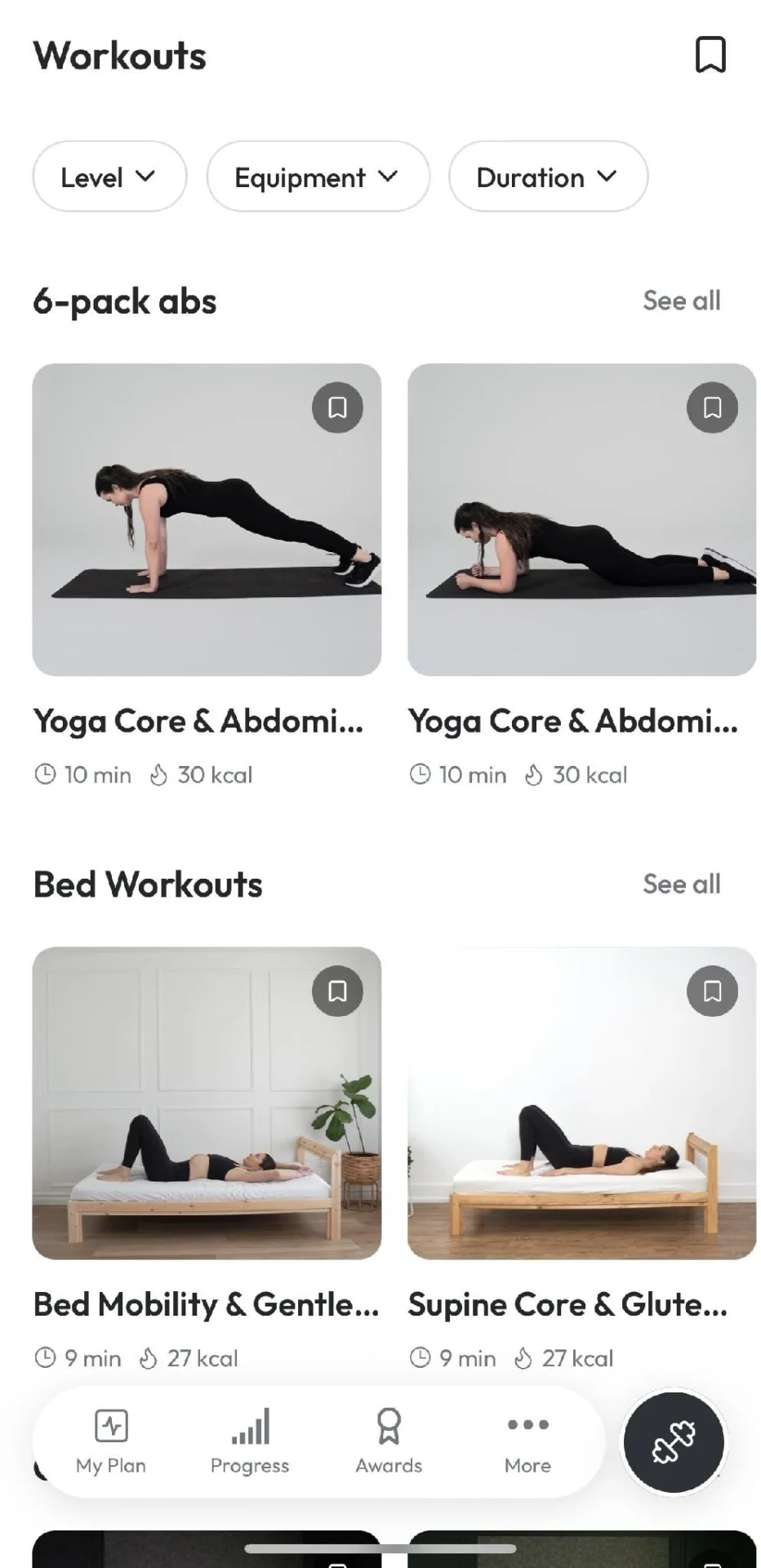
The workout library is filterable by level, equipment and duration, with themed rows such as core sessions and bed workouts.
The library leans toward low-impact, short sessions by design, which is what makes it approachable for someone who hasn’t exercised in a while and easy to fit around a working day.
Guides, meal plans and Stories
The Guides section is where the nutrition side lives. There are seven in the Essential Guides list: Vegetarian, Traditional (balanced), Mediterranean and High Protein meal plans, plus a Supplements guide, an Emotional Eating guide and a general Nutrition guide. Each shows a reading time, mostly 10 to 12 minutes, and opens as a designed, booklet-style document inside the app rather than a wall of text. The meal plans come in versions for men and women, and the spread of diets means most people will find one that matches how they already eat rather than having to adopt a new one.
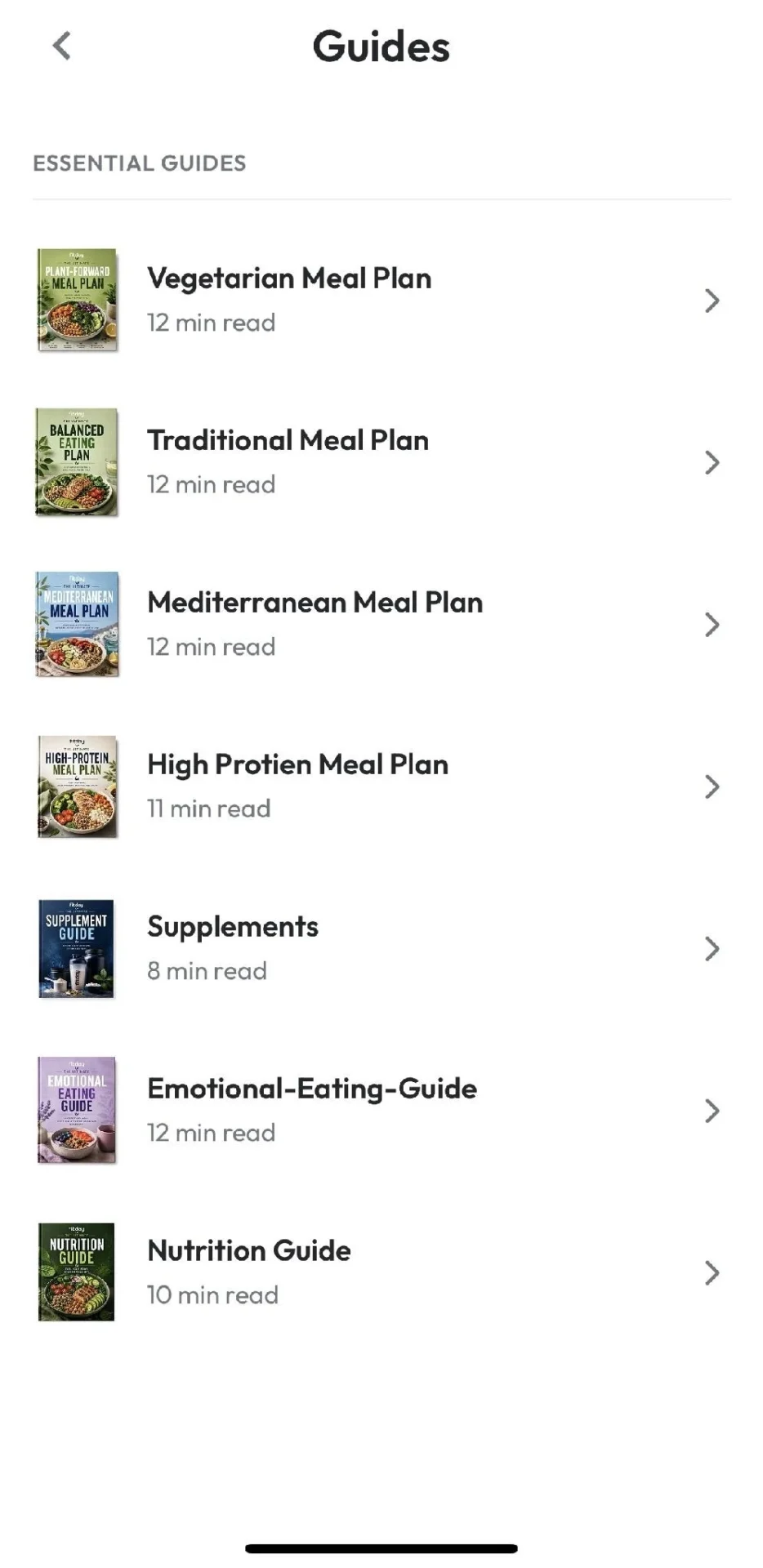
Seven guides cover meal plans for the main eating styles plus supplements, emotional eating and general nutrition, each a 10-to-12-minute read.
Alongside the guides is a Stories section: short, two-minute reads in an Instagram-style format on topics like Tai Chi 101, walking for weight loss, running versus incline walking, calisthenics for beginners and how intermittent fasting works. They’re searchable and quick, and they fill the gap between the long guides and the daily workout with a bit of context on why the plan looks the way it does.
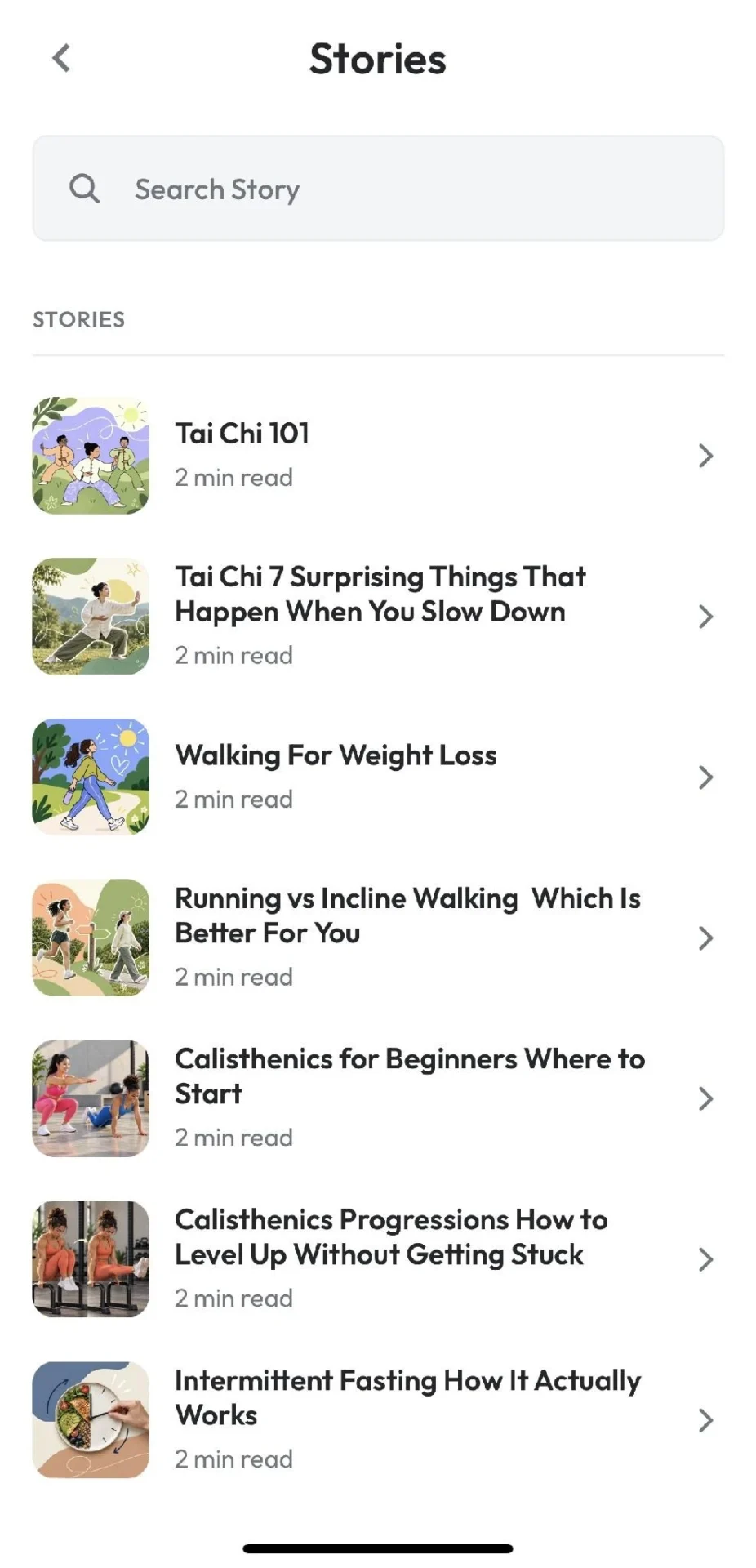
Stories are two-minute reads on walking, tai chi, calisthenics and nutrition topics, with a search bar at the top.
Progress tracking and Apple Health
The Progress tab opens with a prompt to connect Apple Health (Health Connect on Android), which is how Fitday gets steps and activity from your phone or watch without you logging anything. Fitday doesn’t pair with wearables directly, but anything that writes to Apple Health flows through. Below that is a Weight history card showing start, current and target weight with a progress bar and an Add Weight button, then a Steps card with current against target. It’s a clean, uncluttered view: three numbers that matter and nothing else.
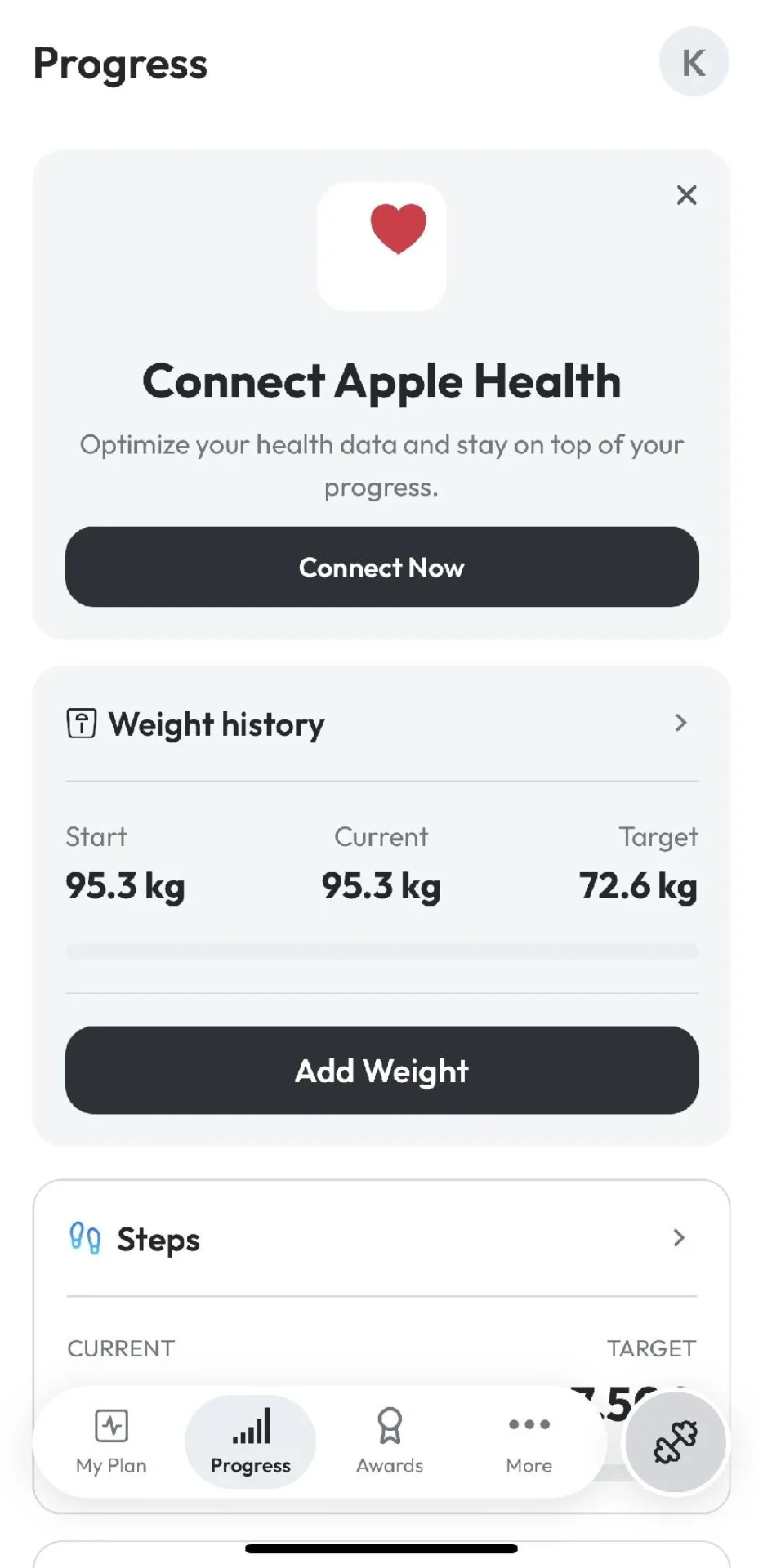
The Progress tab offers Apple Health sync, a weight history with start, current and target, and a steps card.
A quick tip: connect Apple Health on day one, and the step ring on the home screen starts filling in straight away.
Fitday customer support
Support is available through the contact form on fitday.ai and the FAQ page, and the site states that support is available around the clock.
Who Fitday is for, and the alternatives
Fitday is a good fit for anyone starting from a low base, coming back after a long gap, or who has bounced off apps that demand 45 minutes and a gym. The ten-minute videos, the 7,500-step target and the one-workout-a-day layout are all calibrated for consistency over intensity, and the quiz’s age-inclusive framing and the bed-workout rows suggest it’s thought about users well beyond the twenty-something gym crowd.
If detailed calorie and macro logging is your priority, MyFitnessPal remains the reference; Fitday takes the lighter route of meal plans and guides instead of a food diary. Noom covers similar habit-and-psychology ground with a heavier coaching and lesson load. BetterMe is the closest comparison in format, with quiz-led onboarding and short home workouts, though its library leans more toward HIIT and strength. Fitday’s edge is how little it asks of you on any given day, and the walking-first approach that most of its rivals treat as an afterthought.
Fitday review: the verdict
Fitday does the unglamorous thing well. It asks enough in the quiz to build a sensible plan, hands you one short workout a day, gives you a step and activity target for the days you skip it, and backs that up with meal plans and guides you can read in a coffee break. Apple Health sync means the tracking mostly takes care of itself. Give the web quiz the ten minutes it asks for and the plan it builds is worth it. If you want a routine you’ll still be doing in a month, it’s a strong choice. 4.7 out of 5.
Other Articles You May Find of Interest...
- Urozen Reviews 2026 (EXPOSED) – Legit Daily Prostate Support Or Overhyped Capsule?
- Fitday Review: A Walking-First Wellness App Built Around Consistency
- P-Protect Patches 2026 – Reviews, Pricing, and Does It Work for Men’s Prostate Health Support?
- Top Ethical Coffee Brand for 2026: Sustainable, Transparent, Specialty Coffee Companies
- Neuralisse Reviews 2026 (EXPOSED) – Legit Nerve Support or Overhyped Supplement?
- Dr. Melasmin Calcium Stick Reviews 2026 – Legit Anti-Aging Fix or Overhyped Balm?
- Visivra Supplement 2026 – Reviews, Ingredients, and Does Visivra Work for Vision Clarity and Eye Health?