Your Health Magazine Contributor
4201 Northview Drive
Suite 102
Bowie, MD 20716
More Essential Business Tools For Marketing Healthcare Articles
The Almost-Right Healthcare Image: How to Edit Without Losing What Works
The hardest healthcare marketing image to revise is rarely the worst one. It’s the almost-right image: the patient lifestyle photo with beautiful light and an impossible reflection, the wellness illustration with perfect composition and a distracting sign, or the medical-practice campaign visual that feels finished until somebody notices the wrong color. Starting from zero may lose the qualities that made the original worth keeping.
That’s why the useful question is not “Can AI make a better picture?” It’s “Can I tell it precisely what better means?” Healthcare marketers and practices working with an image-to-image workflow, including flux 3, can approach the original as a draft to protect rather than a mistake to erase. The crucial skill is deciding where the revision begins and where it must stop.

The Healthcare Campaign Portrait That Nearly Made the Deadline
Imagine a cyclist waiting at a crossing in light rain for a healthcare campaign promoting active living and cardiovascular wellness. Their yellow jacket cuts through the gray street; a red awning frames the top of the photograph; headlights shimmer on the road. It’s an attractive image, but the healthcare organization’s approved brand color is dark green, and the lettering on the awning is meaningless.
There are two visible problems, but they are not the same kind of problem. Changing a jacket color should preserve its folds, shadows, and material. Removing lettering requires rebuilding a small area of fabric so the replacement looks as though it was always there. Treating both as “make this image more professional” invites changes nobody requested.
The assignment is to make two corrections and leave everything else alone. That sounds restrictive. For paid creative work, it’s often the most valuable instruction you can give.
Write an Edit Brief Before Writing an Edit Prompt
A good brief is short enough to refer to while comparing results. It separates the image into three categories instead of throwing every observation into one long sentence.
- Lock the Decisions That Already Work
List what made you choose this version: camera height, cyclist’s posture, bus position, street reflections, lighting direction, and the expression on the subject’s face. These are not decorative details. Together they create the identity of the image.
Don’t assume “keep everything else” is sufficient. If the face is essential, say so. If the reflection helps carry the composition, name it. The edit will still need inspection, but your instruction now has a clear target.
- Name the Smallest Acceptable Change
“Improve the jacket” could produce new fabric, a different cut, or a replacement outfit. “Change the yellow jacket to dark forest green while preserving its shape and folds” describes one decision. Use the same discipline with objects, backgrounds, and unwanted text.
When a problem has a measurable boundary, state it. For the awning, the change ends at the sign area. The stitching, wrinkles, angle, and surrounding shadows should remain consistent.
- Decide How You Will Know It Worked
Approval criteria belong in the brief, not only at the end of the process. The coat is green; the cyclist still looks like the same person; the awning appears unprinted; the street retains its original lighting. These four observations are easier to assess than whether the new result simply “looks nicer.”
If two reviewers disagree, ask which criterion they are judging. A shared standard prevents feedback from becoming an endless series of taste-based requests.
Edit in Passes, Not in One Giant Request
Start with the jacket. A workable instruction is: “Change only the cyclist’s yellow rain jacket to deep forest green. Preserve the garment’s cut, fabric folds, highlights, face, pose, background, and reflections.” Save the result separately from the original. If the jacket changes but the facial features drift, return to the original or tighten the instruction; don’t build your next edit on an unnoticed mistake.
Only after approving that pass should you address the awning: “Remove the illegible lettering and restore plain red canvas, keeping the fabric seams, perspective, wrinkles, and existing shadows.” This approach is not guaranteed to produce a perfect edit. It simply makes failures easier to identify. When several unrelated modifications are requested at once, a good change can conceal a bad one.
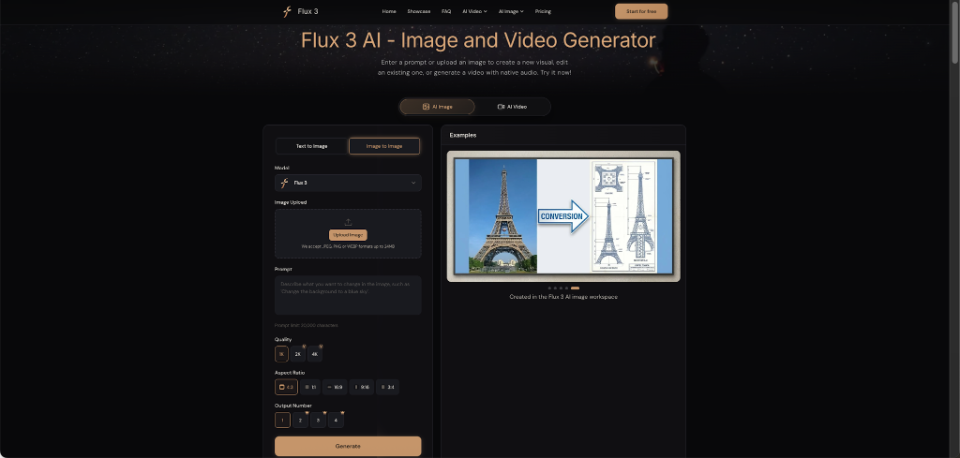
An image-to-image editor such as flux 3 provides a place to upload a visual reference and express the desired change in language. The important practice is to compare each output against the approved version, not against a vague memory of it. Keep a copy of the original visible during review.
Three Ways a Successful-Looking Edit Can Still Fail
Many errors reveal themselves only after the immediate problem appears solved. These are worth checking deliberately rather than discovering them after a client has downloaded the file.
Identity Drift
The green jacket is right, but the cyclist’s jawline, hair, or pose has subtly changed. At thumbnail size, the revision looks excellent. Side by side, it is clearly a different person. Use a close crop to inspect identity-critical features, especially when multiple campaign assets must depict the same character.
Physical Mismatch
The awning has no lettering, but its replacement area lacks the grain of the original canvas. Perhaps a streetlight still creates a shadow from an object that was removed. Look for inconsistent lighting, edges, reflections, and contact points. An object can be individually convincing and still fail to belong in the scene.
Text That Looks Right Until You Read It
A decorative word may look plausible until someone checks the spelling. For factual labels, dates, prices, or brand marks, verify every character. If accuracy is nonnegotiable, placing final text in a conventional graphics editor may be safer than repeatedly regenerating it inside an image.
A Small Review Sheet Beats Endless Regeneration
Before sending the edited image, compare the original and newest version at the same zoom. Review the actual campaign crop as well as the uncropped image. Then work down a compact list:
- Change: Is the requested correction visible and complete?
- Continuity: Did any approved detail move, disappear, or change identity?
- Reality: Do shadows, perspective, anatomy, and reflections still make sense?
- Accuracy: For healthcare imagery, are medical equipment, procedures, body features, uniforms, and other clinical details represented accurately and without creating a misleading impression?
- Delivery: Are the size, crop, text, and usage permissions appropriate?
A short version history is useful too. “Version 2: color fixed, face altered. Version 3: face restored, awning untouched.” These notes stop teams from mistaking the latest file for the best file. If you need feedback, share two clearly labeled candidates rather than a folder of twenty ambiguous exports. Ask the reviewer to identify the single issue still blocking approval. That keeps the next revision focused and prevents a late request for a different mood from reopening decisions the team already made.
Know When to Abandon the Fix
There is a point at which repair becomes more expensive than regeneration. Suppose the cyclist’s bicycle has impossible geometry, the rider is cut off by the frame, and the main light arrives from two directions. Those are structural failures, not small defects. Correcting one may expose another.
A practical decision rule is simple: edit when the approved composition is more valuable than the remaining flaws; generate again when the composition itself is the flaw. You may also use a successful version as a reference for a new image, if your chosen workflow supports that option. The goal is the finished visual, not loyalty to one file.
An almost-right healthcare image represents real creative progress. The frame, mood, and subject may already be doing their jobs. Protect those choices, state each correction plainly, and review changes for both visual quality and healthcare accuracy before publication. That is how “almost” becomes ready to use.
Other Articles You May Find of Interest...
- The Almost-Right Healthcare Image: How to Edit Without Losing What Works
- What Makes a Physicians Email List Reliable? 7 Data Quality Checks for Healthcare Outreach
- Dermatology Marketing: Local SEO Lead Generation Guide for Aesthetic Practices
- Biomechanical Safety in AI-Generated Exercise Videos for Rehabilitation
- What Patients Decide From Your Directory Photo Before They Ever Book
- Comparing AI Meeting Tools for Client Calls in 2026
- How Dental Practices Can Build a Trustworthy Digital Front Door