More Essential Business Tools For Marketing Healthcare Articles
AI Video Generator Guardrails for Trustworthy Healthcare Marketing
Healthcare communication asks viewers to make decisions under uncertainty. That makes visual trust especially valuable and unusually easy to damage. An AI Video Generator can help a practice or health brand create controlled explanatory scenes, but it should not be used to manufacture patients, clinicians, outcomes, or authority. The production brief must separate illustration from evidence before anyone writes a prompt.
The safest starting point is not “What can this model make?” It is “What does the audience need to understand, and which parts must remain factual?” A short animation may clarify a process, introduce a facility, or turn approved health guidance into a more approachable sequence. It should never quietly convert a hypothetical scene into something that looks like a real testimonial or documented result.
Trust Depends on Verifiable Visual Signals
Healthcare audiences look for cues that a source is competent, relevant, and honest about uncertainty. Video can support those judgments through clear language, identifiable authorship, accessible presentation, and a visible route to more information. It can also undermine them through fabricated white coats, invented before-and-after imagery, or overly precise claims that have not passed clinical and legal review.
Decide how viewers will identify the accountable organization. Display the real practice or publisher name, name the qualified reviewer when appropriate, date information that may change, and link to the complete written resource. Generated visuals should not become an anonymous authority. MakeShot may provide the production environment, but the healthcare organization must remain visibly responsible for the message.
Keep People Real or Clearly Fictional
MakeShot’s responsible-use guidance says not to generate real, identifiable people without consent. Healthcare teams should apply an even stricter internal standard. Do not animate patient photographs outside the recorded consent scope, imitate a clinician, or create a synthetic testimonial that viewers could mistake for lived experience. When a human figure is unnecessary, diagrams, objects, spaces, and abstract motion are often clearer and safer.

Match Every Claim to an Approved Source
A polished scene can make weak wording feel authoritative. Build the script from approved clinical or product information, not from the generation output. Mark statements that describe benefits, risks, timing, or expected results, and route them to the appropriate medical, regulatory, or legal reviewer. If the evidence supports only a possibility, the video should not depict certainty.
| Communication job | Lower-risk visual approach | Human approval needed |
| Explain an appointment flow | Rooms, icons, and neutral process scenes | Operations and accessibility review |
| Introduce a treatment topic | Approved diagrams with restrained motion | Clinical and claims review |
| Promote a facility | Owned location images and factual captions | Privacy and brand review |
| Share patient experience | Consented real account or explicit dramatization | Consent, clinical, and legal review |
Design the Workflow Around Approved Facts
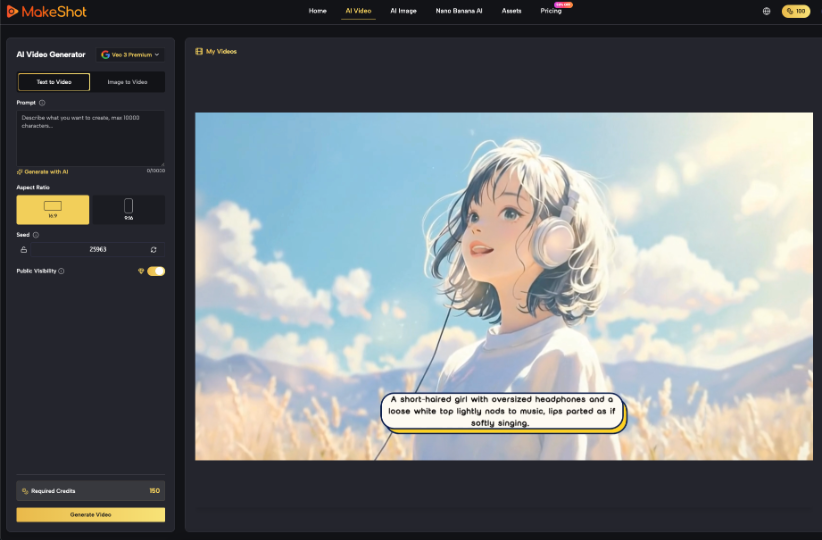
MakeShot supports text-to-video and image-to-video creation with multiple models, and selected options provide reference images or frame control. Those capabilities are useful for exploring visual treatments around an approved message. They do not validate the message. A healthcare workflow should therefore lock the factual brief first, explore visuals second, and review the actual output frame by frame.
Prepare a Controlled and Minimal Input Package
Collect the approved script, pronunciation guide, brand assets, source images, consent records, required disclosures, and words that must not change. Remove protected health information from prompts and uploads. The platform says prompts, uploads, and generated videos are private by default and deletable, but privacy settings are not a substitute for data minimization or an organization’s own compliance review.
Use placeholders during early concept work when a real name, appointment detail, or record is not necessary. If a visual needs to show a form or interface, create a purpose-built fictional example rather than capturing a working system. The reviewer should be able to inspect every input without discovering hidden patient data in a background, file name, metadata field, or screen reflection.
Generate Scenes That Explain One Point
Use the AI Video Generator for narrow visual tasks: a calm transition through an appointment process, a product mechanism represented without outcome claims, or a neutral background for approved narration. Ask for one action and a stable composition. Avoid invented charts, labels, instruments, and clinical environments that could imply a level of accuracy the generation has not earned.
- Lock the audience question and approved factual answer.
- Classify each planned scene as fact, illustration, or dramatization.
- Generate a limited set of variants from cleared inputs.
- Review frames, captions, audio, disclosures, and accessibility together.
- Archive the approved version with its source and consent records.
Review the Meaning Viewers Could Infer
Final review should examine the complete impression rather than individual sentences. A voice-over may be technically cautious while a scene implies a guaranteed recovery. A disclaimer may be accurate but unreadable. A fictional person may resemble a real clinician when combined with a logo and local setting. Ask reviewers to describe what they believe happened in the video; disagreements expose ambiguity worth fixing.
Check Accessible Delivery Alongside Clinical Accuracy
Captions, readable text, sufficient contrast, a transcript, and restrained motion are not secondary polish. They determine whether the approved information reaches people who are deaf, hard of hearing, visually impaired, cognitively overloaded, or viewing without sound. Avoid flashing, rapid cuts, and dense medical text. Link the video to a complete written explanation rather than making playback the only route to essential guidance.
Test comprehension with someone outside the production team. Ask what action the video recommends, what result it appears to promise, and where the viewer would go for complete information. If the answers differ from the approved brief, revise the content rather than blaming the viewer. This small test often catches jargon, ambiguous timelines, and visual implications that expert reviewers have learned to overlook.
Where Automation Still Needs Clinical Judgment
Generation cannot determine whether advice is appropriate, a claim is substantiated, a disclosure is sufficient, or consent remains valid in a new context. High-risk topics require qualified clinical, regulatory, privacy, and legal review. If the team cannot explain the source and status of a claim, it should not make the final cut.
Make a separate plan for updates. Guidance, services, staff, pricing, and contact routes can change while a polished clip continues to circulate. Add a review date and owner to the asset record, and remove or replace versions whose factual basis is no longer current. A video library without maintenance can turn yesterday’s approval into today’s misinformation.
MakeShot can reduce the effort needed to prototype a clear healthcare explanation. The lasting trust, however, comes from an evidence-led script, minimal sensitive data, honest visual framing, accessible delivery, and named human reviewers. Those controls make speed useful without allowing visual plausibility to outrun clinical truth.
Keep audience feedback with the asset record. Questions, complaints, and misunderstandings can reveal where a technically accurate scene was still unclear or emotionally inappropriate. Review those signals with the clinical owner and update the written source as well as the video when the problem affects both. Trust improves when correction is visible and systematic.
Other Articles You May Find of Interest...
- Telehealth SEO: the two constraints nobody writes about
- How To Create Ai Video For Clinic Waiting Rooms
- How to Make Your Dental Practice Stand Out From the Crowd
- Where Personalized Floral Visuals Fit in Healthcare Marketing
- How Search Shapes the Patient Journey
- What DTC Brands Can Learn From An Industry That’s Banned From Advertising
- Why Healthcare Brands Need a Specialist PR Strategy